Recently, I was needed to search for all the Stored Procedures having a given text in its definition. So, as usual did the g 🙂 🙂 gling, most of the top results returned were suggesting to use INFORMATION_SCHEMA.ROUTINES view like below, which is not going to return correct result in all the scenario’s:
Below Script gives Wrong Result:
SELECT ROUTINE_NAME, ROUTINE_DEFINITION
FROM INFORMATION_SCHEMA.ROUTINES
WHERE ROUTINE_DEFINITION LIKE '%SearchString%'
AND ROUTINE_TYPE='PROCEDURE'
As usual tried to understand the query and thought of checking it’s correctness. And to my surprise when I checked this view’s definition using: sp_helptext ‘INFORMATION_SCHEMA.ROUTINES’, the ROUTINE_DEFINITION column was returning only the first 4000 characters of the Stored Procedure definition i.e. in view ROUTINE_DEFINITION column is defined as: convert(nvarchar(4000),object_definition(o.object_id))AS ROUTINE_DEFINITION. So with this it is clear that it will not return all the Stored Procedure’s which have the first occurrence of the search sting in its definition after 4000 characters.
To get correct results we can use sys.procedures view as below, as the return type of the function OBJECT_DEFINITION(object_id) which returns Stored Procedure definition is of type nvarchar(max):
Below script gives Correct Result:
SELECT OBJECT_NAME(object_id),
       OBJECT_DEFINITION(object_id)
FROM sys.procedures
WHERE OBJECT_DEFINITION(object_id) LIKE '%SearchString%'
Below screen shot illustrates the difference between these two queries:
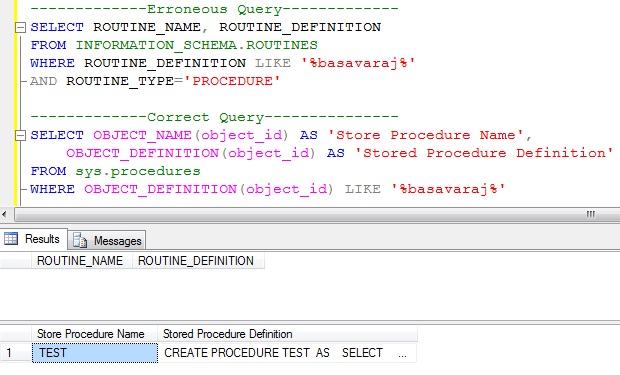
There are multiple alternative way’s with which we can correctly find all the Stored Procedure’s having a given text. And sys.procedures explained in this article is one such solution.
Please correct me, if my understanding is wrong. Comments are always welcome.
Wow, that’s crazy that ROUTINE_DEFINITION only gets the first 4000 characters! Any idea as to why they would implement it so? Pretty much everyone (including myself which I believe was one of your sources: http://devblog.grinn.net/2008/02/search-for-stored-procedure-containing.html) uses ROUTINE_DEFINITION to perform such a query, so this is a big find, Basavaraj!
Do you know view sys.Sql_modules?
Select object_name(object_id), definition
From sys.sql_modules
Where definition like ‘%searchstring%’ and objectpropertyex(object_id, ‘isProcedure’)=1
Yes. We can use sys.Sql_modules as well.
hey
I need how to make store procejer to make
Brilliant find dude! I was beating my head against my monitor for an hour wondering why I couldn’t match a string in a long SP using ROUTINE_DEFINITION, but now I know! You rock!
Thank you Zach for your comments
HI basavaRaj, how to listout all tables from any procedure, which are selected which are deleted which are updated like this.
Thanku in advance..
Hi Prasad,
Please go through the article:
https://sqlhints.com/2013/05/06/how-to-find-referenceddependent-objects-like-table-function-etc-of-a-stored-procedurefunction-in-sql-server/
Thanks,
Basavaraj
Hi ,
Tnk u for u r guidence. Through result of dm_sql_referenced_entities how we recognise which tables are deleted,inserted,updated,selected in procedure
Tnk u in Advance..
One approach is to first Capture the SP and it’s dependent Tables in some Temporary Table. Then look into the sp content by using sys.procedures & OBJECT_DEFINITION(object_id) for each of it’s dependent table by comparing sp content with ‘%INSERT INTO TableName%’ or ‘%INSERT INTO Schema.TableName%’ for insert, similarly for update and delete. But one drawback with this approach is if sp has commented text having any of these matching criteria then it returns incorrect result…
Hi,
when I try to use sys.dm_sql_referenced_entities in ssms2008 system displays as “Invalid object name ‘sys.dm_sql_referenced_entities’.”,but in one article says “sys.dm_sql_referenced_entities” it is available from 2008 onwards..
It should work in Sql Server 2008. Just run the query SELECT @@VERSION to know the Sql Server version. Otherwise you can use SP_DEPENDS.
I have run across the 4000 character limit also. I believe it just the way Enterprise Manager displays the results. The entire text of the object is there, just not displayed.
To prove it try the following:
Declare @sql nvarchar(MAX)
SELECT @sql = ROUTINE_DEFINITION(OBJECT_ID)
FROM INFORMATION_SCHEMA.ROUTINES
WHERE [NAME] = ‘your test routine name here’
Print @sql
This should show the entire text of the command.
The best option is:
SELECT *, OBJECT_DEFINITION(object_id) ObjectDefinition
FROM sys.objects
WHERE OBJECT_DEFINITION(object_id) LIKE ‘%SearchString%’
🙂 get everything
I was looking for this .. Were googling a lot and found your article. It really helps!!!!
Thanks !!.. I just bookmarked it!! 🙂
will check the site for new tips on my free time!!
Great – superb work…:)
Great artical.thank you very much.I was looking for this.
Bcz some times my one of storeprocedures is droping. i was unable to find which storeprocedures casuse to droping that storeprocedures. using this script i found that storeprocedures.thank you again.
Good information…!!!
Wooohooo that saved me lot of time, really very handy article thanks alot for this information got to know about ROUTINE_DEFINITION,, Cheers keep going
Thank you for the above queries. I need one more query which can fetch only the particular word in the stored procedure.
For example.
If we query ROUTINE_DEFINITION like’ ‘_Injury’ , entire store procedure will be fetched which contains the word ‘_Injury’. I need to fetch the exact word which has ‘_Injury’.
My stored procedure contains words like ‘Head_Injury’ ,’Hand_injury’ etc. I want only those words to fetched which concatenated with ‘_Injury’. Could anyone can help me on this?
Thank you.
superb, thanks buddy for sharing this!